
P999 Deposit – Complete Deposit Process, Payment Methods, Limits & Common Problems
The P999 deposit process is one of the first things Pakistani users want to understand before using the platform. New users usually have the same questions: How do I add money to P999? Which payment methods are available? What is the minimum deposit? Why has my balance not updated? And what should I do if a payment fails?
This guide explains the complete P999 Game deposit process in a practical way, including payment verification, deposit limits, pending transactions, failed payments, wallet issues, bonus conditions, and security checks. Because P999-branded websites currently publish different information about payment methods and limits, users should treat the deposit screen inside their current P999 account as the final reference rather than relying on an old article or screenshot.
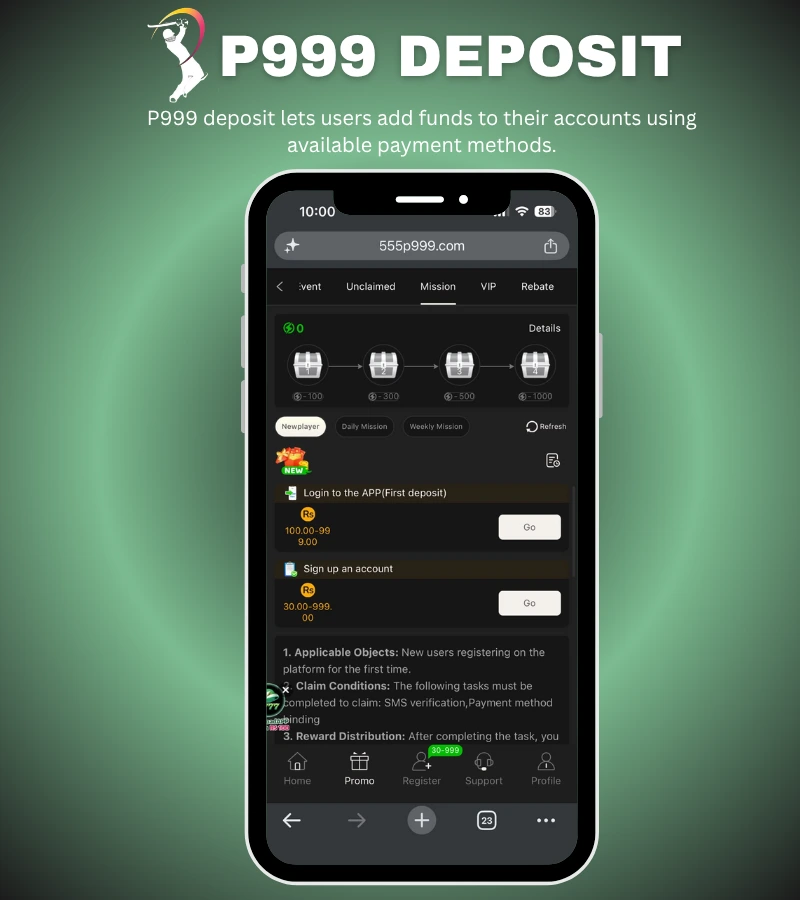
What Is a P999 Deposit?
A P999 deposit means adding funds to your account through a payment method currently supported by the platform. The general process is simple:
P999 Login → Wallet → Deposit → Payment Method → Amount → Payment → Confirmation → Balance Check
The exact buttons and payment options can vary between versions. Some current P999 pages mention JazzCash, Easypaisa, bank transfer, scan-code payments, and USDT, but these should not be assumed to be available on every P999 version or account.
P999 Deposit Process
Before depositing, make sure you are logged into the correct account and have access to the payment method you intend to use.
Step 1: Log In to P999
Open the current P999 application or access method you use and sign in to your registered account. Check your username, mobile number, or other login details carefully. Making a payment while logged into the wrong account can create unnecessary problems later.
Step 2: Open the Wallet
After logging in, look for Wallet, Balance, Deposit, or a similar account-finance option. The location of the deposit button can change between versions, so follow the current interface rather than an old screenshot.
Step 3: Select Deposit
Tap Deposit to see the payment options available to your account. So, this is where you should confirm which payment methods are currently supported.
Step 4: Choose Your Payment Method
Depending on the version and account, P999-branded pages currently mention methods including:
- JazzCash
- Easypaisa
- Bank transfer
- Scan-code payments
- USDT
However, there is conflicting information across P999 websites, so only use a payment method that is actually displayed in your current P999 deposit section.
Step 5: Enter the Deposit Amount
Enter the amount you want to deposit. If preset amounts are displayed, you can select one of those or enter a custom amount if the interface allows it. Before continuing, check the minimum and maximum amount shown for the specific payment method.
Step 6: Verify the Payment Details
This is the step that should never be rushed.
Check:
- Payment account or number
- Deposit amount
- Payment method
- Transaction instructions
- Account information
- Any displayed fee
- Deposit limits
Do not send money to a payment number received through an unrelated WhatsApp, Telegram, Facebook, or social-media message.
Step 7: Complete the Payment
Complete the transaction through the payment service selected by the P999 interface. If using a mobile wallet, carefully verify the receiving details before confirming the transfer. If using a bank or scan-code method, check the beneficiary or payment information before sending funds.
Step 8: Save the Transaction Reference
After completing payment, keep your transaction ID, receipt, or reference number. This becomes important if the payment is deducted from your wallet but does not immediately appear in your P999 balance.
Step 9: Check Your P999 Balance
Return to your account and check the Wallet or transaction history. If the payment is successful, the balance should update according to the platform’s current processing system. Do not immediately make another deposit simply because the first transaction has not appeared.
P999 Deposit Methods
Payment availability is one of the areas where current P999 information differs between websites. Some P999 pages currently advertise JazzCash and Easypaisa, while others additionally mention bank transfer, scan codes, or USDT.
For that reason, the safest approach is:
Open P999 → Deposit → Check the payment methods currently displayed → Choose one → Verify the details
JazzCash
If JazzCash is currently available in your P999 deposit section, select it and follow the payment instructions shown by the platform.Before confirming the transaction, carefully compare the displayed payment details with what you enter in JazzCash. Save the JazzCash transaction reference after completing the payment.
Easypaisa
If Easypaisa is available, select it from the current P999 deposit options and follow the displayed instructions. Check the receiving number or account details before sending money and keep the Easypaisa transaction record afterward.
Bank Transfer
Where bank transfer is offered, carefully verify the beneficiary information before making the payment. Bank transactions can be difficult to reverse, so do not rely on an old bank account number copied from another website.
USDT
Some current P999 pages mention USDT deposits. If cryptocurrency is displayed as an option, check the exact network shown by the platform before sending anything. Sending cryptocurrency through the wrong network can result in funds becoming difficult or impossible to recover.
P999 Deposit Amount In Pakistan
There is no single deposit amount I would recommend publishing as a universal P999 limit. Current P999-related pages give conflicting figures. One page currently states a PKR 100 minimum and PKR 500,000 maximum for certain local methods, while another P999 page states a PKR 500 minimum.
That makes a static “P999 minimum deposit is exactly X” statement potentially misleading. Use this table on your page instead:
| Deposit Information | What Users Should Check |
|---|---|
| Minimum deposit | Amount currently displayed in the P999 deposit screen |
| Maximum deposit | Limit for the selected payment method |
| Payment fee | Any fee shown before confirmation |
| Processing status | Successful, pending, or failed |
| Transaction reference | Save after payment |
| Bonus requirement | Read before accepting an offer |
P999 Login Bonuses
Some P999 websites advertise deposit bonuses and promotional offers. Current search results include claims about deposit promotions, but the terms differ between sites. Before depositing specifically to receive a P999 deposit bonus, check the actual promotion terms.
Look for:
Qualifying deposit: What amount or payment is required?
Bonus percentage: How much promotional balance is provided?
Wagering requirement: How much eligible gameplay is required before withdrawal?
Expiry: When does the promotion end?
Eligible games: Which games count toward the promotion?
Withdrawal conditions: Are there restrictions on withdrawing promotional funds?
A bonus should never be described as guaranteed cash. Promotional balances can have conditions that materially change their value.
P999 Deposit Pending – What Should You Do?
A P999 deposit pending status means the transaction has not yet been fully confirmed. Do not assume that pending means the money is permanently lost. First check your payment account.If the money has not been deducted, review the payment details and current deposit instructions before trying again. If the money has been deducted, keep the transaction reference and avoid making another identical deposit until the first transaction has been resolved.
P999 Deposit Pending Checklist
Check:
- Your payment-wallet transaction history.
- Your P999 transaction history.
- The transaction reference.
- The amount sent.
- The payment account used.
- Whether the deposit is still marked pending.
If the transaction remains unresolved, contact support through a channel published by the platform you actually used.
P999 Deposit Failed
A failed deposit can have several causes.
The most common possibilities include an incorrect payment detail, exceeded payment limits, insufficient wallet balance, payment-provider problems, temporary technical issues, or an unsupported payment method.
How to Fix a Failed P999 Deposit
Start by reading the error message instead of immediately trying another payment.
Then check:
Payment balance: Make sure enough money was available.
Deposit limit: Confirm the amount falls within the current range.
Payment details: Make sure the receiving information was correct.
Payment method: Confirm that the method is currently supported.
Internet connection: A connection interruption can sometimes prevent confirmation.
If money was deducted despite the transaction showing as failed, keep the receipt and transaction reference.
Money Deducted but P999 Balance Not Updated
This is one of the most important payment problems to explain on a P999 deposit page.
Suppose you send PKR 1,000 through your payment wallet and the money leaves your wallet, but your P999 balance remains unchanged.
Do not immediately send another PKR 1,000.
Instead:
1. Check your wallet transaction history.
Confirm whether the payment was actually completed.
2. Save the transaction ID.
This is your strongest reference for identifying the payment.
3. Check P999 transaction history.
Look for pending, failed, or successful status.
4. Allow the platform’s stated processing period.
Do not rely on another website’s claim that every payment is instant.
5. Contact legitimate support if necessary.
Provide the transaction reference and relevant payment evidence, but never provide your OTP or wallet PIN.
Wrong P999 Payment Number
Entering the wrong payment account is one of the most serious deposit mistakes. Before sending money, compare the payment details displayed in your current P999 interface. Do not use a payment number copied from an old article, screenshot, video, or social-media comment. Payment details can change, and an incorrect transfer may not be recoverable.
If your payment has been completed but your balance has not changed, use this simple troubleshooting sequence:
Payment completed?
Check your wallet or bank transaction history.
Transaction ID available?
Save it before doing anything else.
P999 transaction visible?
Check your account’s transaction history.
Status pending?
Wait for the platform’s stated processing period.
No record anywhere?
Verify that you used the correct account and payment instructions.
Still unresolved?
Use the legitimate support option associated with the platform.
P999 Deposit Reversed or Refunded
A payment may sometimes be reversed by a payment provider or fail to settle correctly. If the money returns to your original payment account, do not immediately send it again without checking why the first transaction failed. Look at the transaction status and verify the current deposit instructions. A reversed payment is different from a successfully credited deposit.
P999 Deposit Security Tips
A good P999 deposit guide should address security, not just explain where to click.
Never give another person your:
- OTP
- Wallet PIN
- Banking password
- Account password
- Recovery code
Be especially careful with people claiming:
“Send money and I will activate your deposit.”
“Pay a fee to unlock your balance.”
“Give me your OTP so I can verify the payment.”
“Send money to this personal number for an instant deposit.”
These are situations where you should stop and independently verify the transaction.
How to Avoid P999 Deposit Scams
The biggest practical risk for users searching for P999 is not knowing which P999-branded website or application is actually associated with the service they intend to use.
Current search results show multiple domains using the P999 name, and the information they publish is not consistent. There is also a Google Play listing for an app called P999 that explicitly states it is entertainment-only and does not support real-money transactions. Therefore, users should not assume that an application named “P999” in an app store is automatically the same service described by a P999-branded website.
Before depositing, verify:
Who operates the service?
Which website or app are you using?
Does the payment method appear inside your own account?
Are the terms and withdrawal conditions clearly available?
Does the payment recipient match the current instructions?
| P999 Deposit | P999 Withdrawal |
|---|---|
| Adds money to the account | Requests eligible money out |
| Uses deposit methods | Uses withdrawal methods |
| Has deposit limits | Has withdrawal limits |
| Payment is sent to the platform | Payment is sent to the receiving account |
| Can become pending | Can become pending |
| Can fail | Can fail |
| Transaction reference should be saved | Withdrawal reference should be saved |
A payment method available for deposits does not automatically guarantee that the same method is available for withdrawals.
Frequently Asked Questions
What is P999 Deposit?
P999 Deposit is the process of adding funds to a P999 account through a payment method currently supported by the service.
How do I deposit money into P999?
Log in, open the Wallet or Deposit section, choose a payment method currently displayed in your account, enter the amount, verify the payment details, complete the transaction, and save the transaction reference.
Does P999 support JazzCash?
Some current P999-branded websites advertise JazzCash deposits, but availability is not consistent across the sites found in current search results. Confirm JazzCash availability inside the P999 account you are actually using.
Does P999 support Easypaisa?
Some P999-related pages currently advertise Easypaisa, but payment options can vary. Check the live Deposit section before sending money.
What is the minimum P999 deposit?
There is no single figure I would publish as universally verified. Current P999 pages give different minimums, including PKR 100 and PKR 500. Check the amount displayed by your current payment method.
Why is my P999 deposit pending?
A deposit can remain pending because of payment processing, confirmation delays, technical problems, or account-related checks. Check your payment receipt and transaction status before making another deposit.
What should I do if P999 takes my money but does not add the balance?
Keep the payment receipt and transaction ID, check both payment and P999 transaction histories, and contact legitimate support if the transaction remains unresolved.
Can I deposit using a bank transfer?
Some P999-branded pages currently advertise bank transfer as an option, but availability depends on the version or service being used. Only transfer money to bank details currently displayed through the legitimate payment process.
Can I get a P999 deposit bonus?
Some P999 pages advertise deposit promotions. Check the specific offer’s qualifying deposit, wagering, expiry, eligible-game, and withdrawal conditions before depositing for a bonus.
Is P999 deposit safe?
Safety cannot be determined simply from the name “P999.” Current search results show multiple P999-branded websites with inconsistent information, so users should verify the actual service, payment recipient, terms, and application before depositing.
To Conclude
A good P999 deposit guide should do more than say “open the app and click Deposit.” The useful information is what happens when the normal process does not work.
Users need to know how to choose a payment method, verify payment details, understand deposit limits, preserve transaction evidence, troubleshoot pending payments, handle failed deposits, and recognize suspicious payment requests.
The current P999 search landscape also shows why accuracy matters more than stuffing the page with claims. Different P999-branded sources currently give different deposit limits and payment options, so publishing a fixed amount or promising instant credit without verification could make your page less trustworthy.
For your website, I would make this page stronger still by adding your own verified screenshots of the actual P999 deposit screen, the date you checked the payment methods, and a short editorial note explaining which figures were personally verified. That gives you a genuine first-hand signal instead of repeating the same P999 claims already appearing across competing pages.